
Popl: AI Lead Capture
Popl CoBusiness
4.81.24K Reviews
- Version
- 8.15.0
- Installs
- 500.00K
- Age Rating
- Teen
Screenshots
Our Review of Popl: AI Lead Capture
 Analysis by Appyee
I approach digital networking tools with one practical question: will they make the moment after a good conversation easier, or add another task to it? Popl: AI Lead Capture is a business app from Popl Co built around collecting and handling professional contacts. Its appeal is clearest when I want to turn a brief introduction into a follow-up I can actually find later, rather than leave a paper card in a pocket and hope I remember the details.
When a connection depends on the network
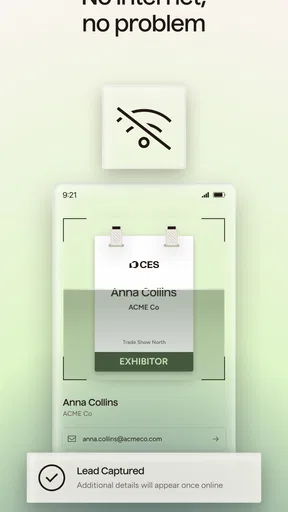
Lead capture often happens in places where the internet is not something I think about until I need it: a crowded event, a venue with patchy reception, or a meeting room where everyone is trying to get online. Popl’s workflow is most useful when the app can complete the exchange promptly, so I’d treat connectivity as part of the plan rather than an afterthought. Before a busy event, I would open the app and make sure I know where its sharing and scanning tools are, instead of learning the controls while someone is waiting.
That small bit of preparation matters because a networking conversation has a natural rhythm. If I pause to troubleshoot, the contact exchange can feel more awkward than simply asking for a card or noting a name. I’d also keep a fallback in mind: if a scan or digital handoff stalls, agree on a simple next step, such as exchanging details another way, then return to the app when the connection is reliable. That is not a criticism unique to Popl; it is a sensible habit for any tool used in a live conversation.
Better suited to active networking than passive address books
The app makes the most sense to me for people who meet new prospects regularly: sales representatives, recruiters, consultants, founders, or staff working a trade event. The value is not just collecting a contact but creating a bridge between meeting someone and following up while the conversation is still fresh. If I attend events only occasionally, a phone contacts app may be enough. If I routinely come home with names, cards, and half-remembered context, a dedicated lead-capture workflow has a more convincing reason to exist.
There is also a useful distinction between a contact manager and a lead tool. A regular address book is excellent for keeping people’s details; it is less naturally organized around the question, “Who did I meet today, and what should I do next?” Popl is aimed at that second job. I would still avoid treating every scanned contact as a qualified lead. A quick conversation can produce incomplete details or no real buying interest, so I’d review new entries and add useful context before they become part of a follow-up list.
A realistic event-day routine
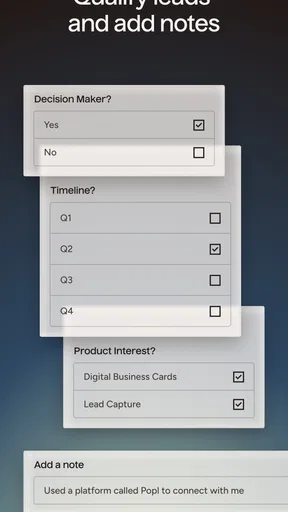
Imagine I’m working a small industry event and speaking with several people between sessions. I can use the app to exchange details or capture a lead, then take a moment after each conversation to note the reason we connected and the next action. That extra note is a better memory aid than a name alone: “send the event recap” is actionable, while “met at the booth” may not be enough once the day gets busy. I would reserve a quiet moment between sessions to check that the captured information looks right rather than wait until I’m back at my desk.
This is where reminders can help, but I would use them selectively. A reminder for a promised introduction or a time-sensitive follow-up is meaningful; a reminder for every person I meet can turn into another noisy list I ignore. The app can support a process, but it cannot decide which relationship deserves attention. My practical tip is to capture fewer, better-qualified follow-ups and make each one specific enough that future me knows why it matters.
What to consider before building it into a workflow
Popl has a 4.8 average from around 16,000 ratings, and it has been installed over 500,000 times. Those figures suggest that it has found an audience, but they do not tell me whether its approach fits every team or event. It is free to start, with in-app purchases ranging from $2.99 to $144.99 per item, so I would first decide which parts of the workflow I actually need before paying for anything. The app is rated Teen, and version 8.3.2 requires Android 7.0 or later.
For a solo professional, a digital card or a phone’s built-in contacts may be simpler if the goal is only to share basic details. For someone who needs to collect prospects and keep follow-ups organized, Popl offers a more focused route than manually entering each person into an address book. Teams should be especially deliberate: decide who owns each lead, what information is useful to record, and how contacts should move into the systems the team already uses. The app’s CRM integration can help connect those steps, but any workflow still benefits from clear conventions about duplicates and follow-up responsibility.
Using it thoughtfully on mobile
At an event, I may be standing, carrying a drink, or moving between conversations, so a tool that requires careful attention can slow me down. I’d keep the phone accessible, use the quickest suitable sharing method, and avoid trying to organize a whole batch of contacts in the middle of a discussion. Capture the essential details first; do the more thoughtful sorting later. That division keeps the human part of networking in front, rather than making the phone the center of the exchange.
There is a trade-off here: digital sharing can reduce the pile of paper cards, but it asks both people to be comfortable with a phone-based handoff. Some contacts prefer a traditional card, and some situations are too rushed for a scan. I would not insist on a single method. Popl works best as an option in my pocket, not as a rule that every person I meet must follow.
Recovery, privacy, and sensible follow-up
When a capture does not go as planned, I would first check whether the connection has recovered and whether the contact needs to be entered another way. Then I’d verify the saved details before sending a message; a mistaken name or incomplete contact field can make an otherwise thoughtful follow-up feel careless. For important conversations, keeping a brief personal note outside the scan itself is a useful safeguard against relying on one rushed interaction to preserve every detail.
Lead information deserves restraint. I would collect only what I need to continue a legitimate business conversation, avoid putting sensitive personal details into casual notes, and use follow-up reminders for a clear purpose. Before connecting a lead-capture app to a wider company process, I’d also make sure the team understands how contacts are handled and who can act on them. Those habits matter whether a person chooses Popl or a more basic contact tool.
As a business app, Popl is a better fit for people who turn introductions into an ongoing sales or networking process than for anyone who simply wants a digital version of a paper card. The main question to ask before relying on it is practical: will I review and follow up on the contacts I capture? If not, collecting them faster will not solve the real problem.
Connectivity shapes the smoothness of the handoff, while preparation, accurate capture, and thoughtful follow-up shape what happens afterward. I’d choose Popl when those lead-management steps are part of my regular work, and keep a simple alternative ready for moments when reception or the conversation itself makes a digital exchange inconvenient. That is the balance that makes a networking app useful rather than distracting.
If you're anything like me, the idea of juggling business cards, contact lists, and leads gives you a bit of a headache. So, when I stumbled upon Popl: AI Lead Capture, I thought, "Why not give it a shot?" Let me take you through my experience with this app and why it might just be the game-changer you’ve been looking for.
First Impressions
Downloading and setting up Popl: AI Lead Capture was a breeze. The interface is slick, intuitive, and super user-friendly. I didn’t have to go through a tedious sign-up process, which is always a win in my book. The app promises to revolutionize how we capture and manage leads, and honestly, it had me curious from the get-go.
Features That Stand Out
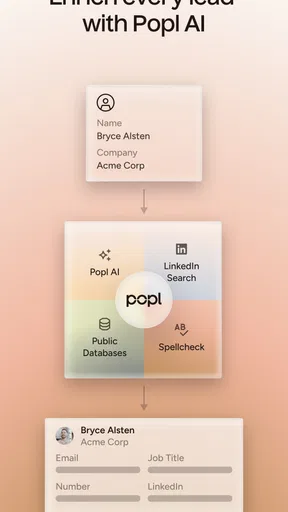
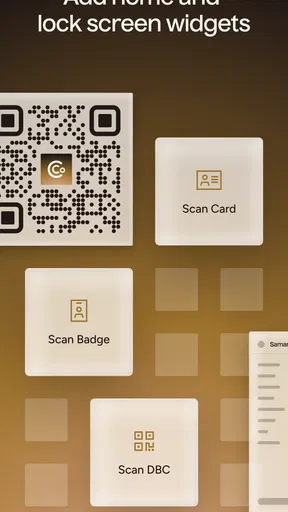
The app is packed with features, but there are a few that really caught my attention. The AI-driven lead capture is top-notch. With just a scan, the app automatically saves and organizes contact information. No more manual data entry! It's like having a personal assistant in your pocket.
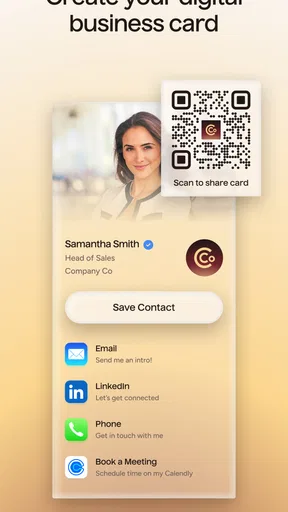
- Instant Contact Sharing: With a simple tap, you can share your contact details. It’s perfect for networking events where you want to stand out.
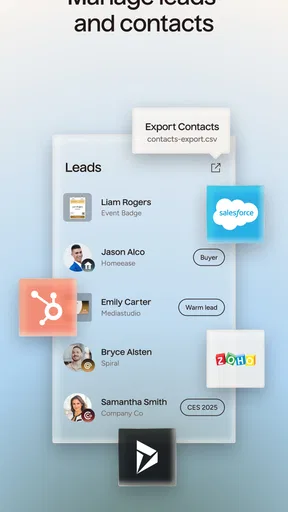
- Lead Management: The app isn’t just about capturing leads; it’s about managing them effectively. You can organize contacts into categories, set follow-up reminders, and even track interactions.
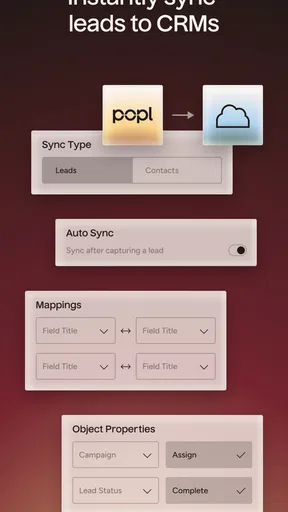
- Integration Capabilities: Popl integrates smoothly with CRM systems, which means you can sync your leads with your existing database without a hitch.
Using the App in Real Life
I took Popl: AI Lead Capture with me to a recent networking event, and let me tell you, it was a game-changer. Instead of fumbling around with business cards, I was able to capture leads with a quick scan. Plus, the app’s AI did all the heavy lifting, organizing the details for me.
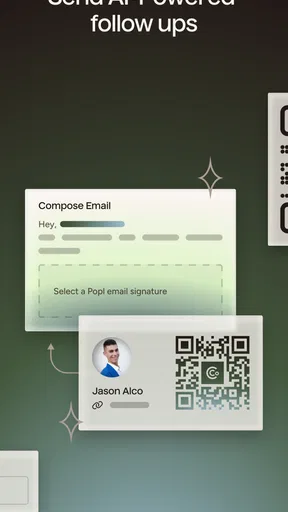
The ability to set reminders for follow-ups directly in the app is a lifesaver. No more missed opportunities because I forgot to send a follow-up email. This app really lets you focus on building relationships, not just collecting contacts.
Why It's Worth Your Time
Now, I know what you're thinking: "Do I really need another app?" But hear me out. Popl: AI Lead Capture isn't just another app; it's a tool that can genuinely streamline your business interactions. Whether you’re in sales, marketing, or just someone who loves networking, this app can save you time and make you more efficient.
Moreover, the seamless integration with other platforms means you won’t have to overhaul your existing systems. It fits right into your workflow, enhancing it rather than complicating it.
Final Thoughts
In a world where connections are everything, having a tool like Popl can give you a significant edge. It's not just about capturing leads; it's about managing them effectively and ensuring that you never miss out on potential opportunities. The app is designed with the modern professional in mind, offering a smart, efficient, and incredibly useful solution for lead management.
So, if you're ready to ditch the traditional business cards and step into the future of networking, give Popl a try. You might just find it becomes your new favorite app!
Verdict
Strengths of Popl: AI Lead Capture
- Easy-to-use interface for quick setup.
- Real-time lead capture and insights.
- Integrates with CRM tools seamlessly.
- Customizable digital business cards.
- Supports NFC and QR code sharing.
Limitations of Popl: AI Lead Capture
- Limited offline functionality.
- Subscription required for premium features.
- Occasional syncing issues reported.
- Requires stable internet connection.
- Not all features are intuitive for beginners.
Similar Picks in This Category
View All
LinkedIn: Community & Network
LinkedIn3.8

Zoom Workplace
zoom.com4.1

Microsoft Teams
Microsoft Corporation4.6

Meta Business Suite
Meta Platforms, Inc.4.6

Webex Meetings
Cisco Systems, Inc.4.5

TeamViewer Remote Control
TeamViewer4.4
Frequently Asked Questions
What is Popl: AI Lead Capture and how does it work?
Popl: AI Lead Capture is an innovative app designed to streamline the process of capturing and managing leads using AI technology. It allows users to easily collect contact information through digital business cards, QR codes, and NFC technology. The app then organizes and analyzes these leads to help enhance your networking and sales strategies.
Is Popl: AI Lead Capture free to use?
Popl offers both free and premium versions. The free version includes basic features like digital business card creation and limited lead management capabilities. The premium version, which requires a subscription, provides advanced features such as enhanced analytics, unlimited lead storage, and integration with CRM platforms.
How secure is the data collected by Popl: AI Lead Capture?
Popl prioritizes user privacy and data security by implementing robust security measures. The app encrypts data both in transit and at rest, ensuring that your information remains confidential. Users retain control over their data, with options to manage, export, or delete their information at any time.
Can Popl: AI Lead Capture integrate with other tools and platforms?
Yes, Popl is designed to integrate seamlessly with popular CRM systems and productivity tools. This feature ensures that your captured leads are automatically synchronized with your existing workflow, enhancing efficiency and providing a comprehensive view of your networking and sales efforts.
What are the benefits of using Popl: AI Lead Capture for businesses?
Businesses can benefit from Popl by simplifying the lead capture process, reducing manual data entry, and improving lead management. The AI-driven insights help identify high-potential leads, optimize follow-up strategies, and ultimately increase conversion rates. This makes Popl an invaluable tool for sales teams and networking professionals.
